Procurement
Procurement
Stop PO chaos, budget overruns, and wasted hours creating purchase orders one at a time.
Save hours creating POs. Zero over-budget purchases slipping through. Budget released automatically when invoices come in under. One PO sheet for multiple identical orders instead of repetitive data entry.
The Problem: Procurement is Slow, Manual, and Budget-Blind
Traditional procurement is painfully inefficient. You need to order materials for five identical townhouses—same supplier, same items, different addresses. Most software forces you to create five separate purchase orders, entering the same information repeatedly. Hours wasted on data entry that should take minutes.
POs get raised and approved without anyone checking if budget exists. You discover overruns after the fact when finance flags it or when you're surprised at month-end. By then, the order's placed, work's started, and you're either absorbing the cost or having difficult conversations with clients about variations.
When invoices come in under PO amounts—supplier only used $8,000 of a $10,000 PO—that $2,000 stays locked in the original cost allocation. Your project budgets show less available than actually exists, creating false constraints on what you can spend.
For medium-density or volume builders, this inefficiency multiplies across every lot. Creating procurement documents becomes a full-time job instead of a quick administrative task.
The Solution: Intelligent Procurement That Saves Time and Protects Budgets
Procurement streamlines the entire purchase order workflow—from creation through invoice reconciliation—while automatically enforcing budget controls that prevent overruns before they happen.
Bulk Purchase Order Creation Building multiple similar homes? Create one PO sheet with multiple purchase orders to the same vendor—each with unique PO numbers, each allocated to different jobs. Enter the information once, generate multiple POs. Five identical electrical contracts? One sheet, five PO numbers, done in minutes instead of hours.
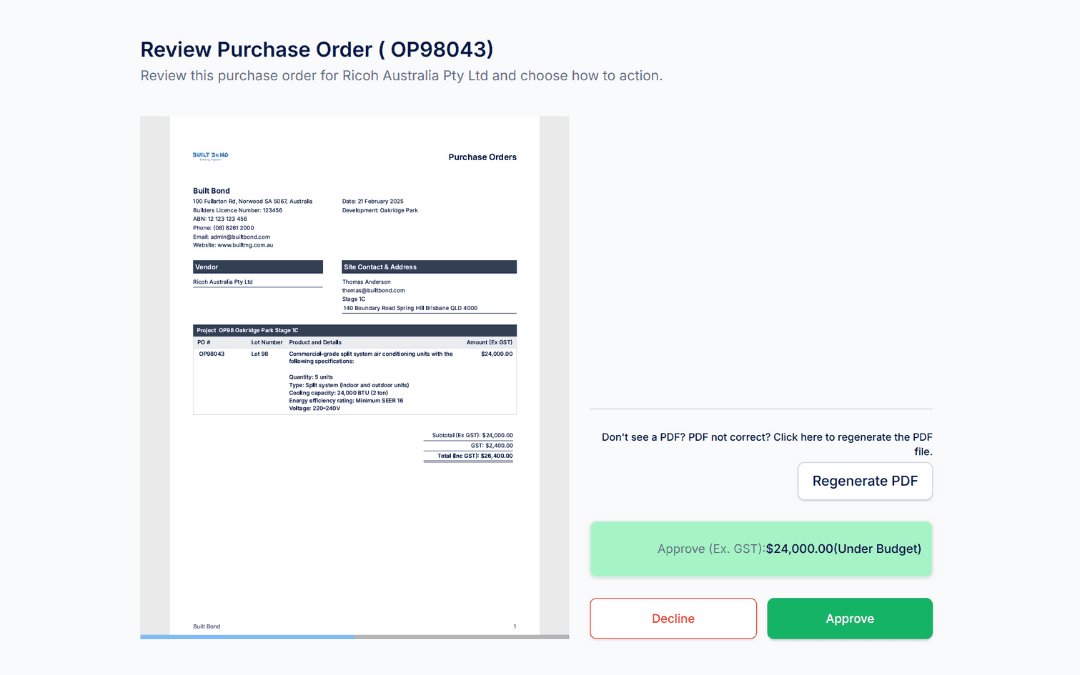
Professional PDF Generation System generates professional PDF purchase orders with all details—vendor information, line items, costs, delivery addresses, terms, conditions. Clean formatting, consistent branding, ready to send. No manual document creation in Word or Excel.
Automatic Budget Checking Before POs can be raised, the system checks: Does this job have budget allocation for this cost? Will this PO exceed the available budget? Real-time validation prevents over-budget purchases from being created in the first place.
Smart Approval Workflows Two approval paths based on budget status:
Within Budget: Streamlined approval workflow for POs that fit allocated costs—faster processing for standard purchases
Over Budget: Escalated approval workflow requiring additional sign-off from senior management or project directors before proceeding
POs can't be issued without appropriate approvals. Budget overruns require deliberate approval, not accidental oversight.
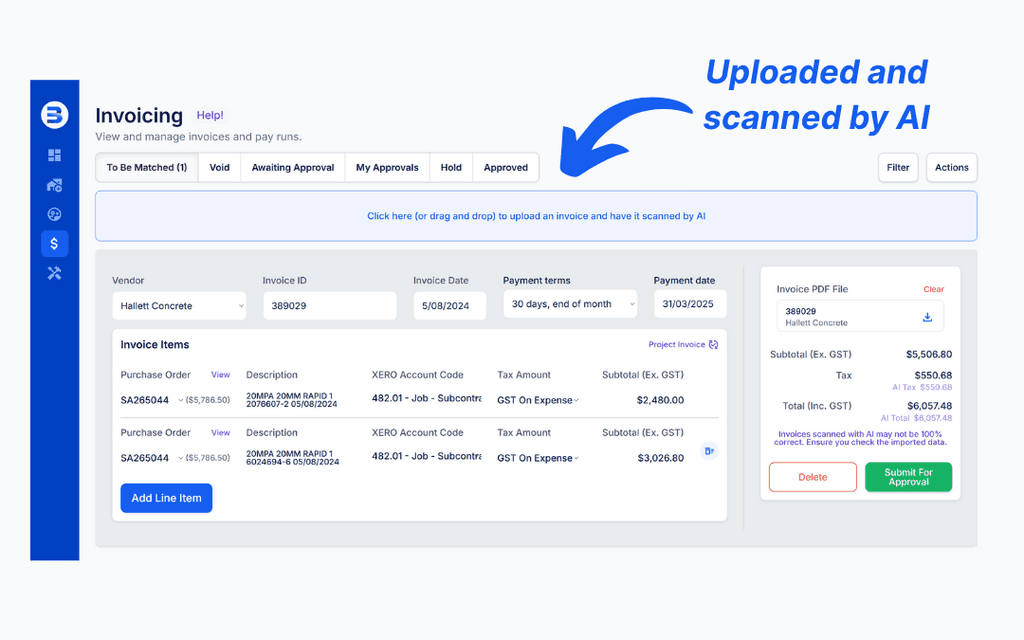
Invoice Reconciliation & Budget Release As invoices are processed, they're matched against POs automatically. Invoice comes in for $8,000 against a $10,000 PO? The $2,000 difference is released back to your project budget automatically. No manual budget adjustments. No locked-up funds that should be available.
Real-Time Budget Visibility See current budget status across all projects: allocated funds, committed (POs raised), spent (invoices paid), and available. Know exactly what you can spend without digging through spreadsheets or waiting for finance reports.
Multi-Project PO Management Managing multiple projects simultaneously? See all POs across projects, filter by status (pending approval, issued, partially invoiced, complete), track commitments vs. actual spend. Complete visibility into procurement across your entire operation.
Supplier PO History View complete PO history with each supplier—previous orders, average delivery times, issues encountered, total spend. Make informed decisions about reliability and pricing based on actual track record.
Benefits & Outcomes
Hours Saved on PO Creation Bulk PO generation means creating multiple orders in the time it used to take for one. Medium-density builders creating the same PO for five lots? Done in one sheet instead of five separate documents. Time saved compounds across every procurement cycle.
Zero Over-Budget POs Slip Through Budget checking happens automatically before POs can be raised. Over-budget purchases require explicit escalated approval. No more discovering at month-end that you've overspent because someone approved a PO without checking budget availability.
Budget Released Automatically When invoices come in under PO amounts—and they often do—unspent funds return to your available budget automatically. No manual adjustments. No budget trapped in completed purchases. More accurate picture of what you can actually spend.
Professional Documentation Generate clean, professional purchase orders instantly. Consistent formatting, complete information, ready to send to suppliers. No more creating documents manually or dealing with inconsistent formats.
Faster Procurement Cycles Streamlined workflows mean purchase orders move from request to approval to issuance faster. Less time waiting for approvals. Less back-and-forth about budget availability. Suppliers get orders sooner, materials arrive faster.
Complete Procurement Audit Trail Every PO created, every approval granted, every budget check performed, every invoice reconciled—automatically documented. Prove procurement process was followed when auditors or project stakeholders ask.
Supplier Management Made Simple Track performance across all POs with each supplier. Identify reliable vendors who consistently deliver on time and on budget. Address issues with suppliers who don't based on documented history, not memory.
The Problem: Procurement is Slow, Manual, and Budget-Blind
Traditional procurement is painfully inefficient. You need to order materials for five identical townhouses—same supplier, same items, different addresses. Most software forces you to create five separate purchase orders, entering the same information repeatedly. Hours wasted on data entry that should take minutes.
POs get raised and approved without anyone checking if budget exists. You discover overruns after the fact when finance flags it or when you're surprised at month-end. By then, the order's placed, work's started, and you're either absorbing the cost or having difficult conversations with clients about variations.
When invoices come in under PO amounts—supplier only used $8,000 of a $10,000 PO—that $2,000 stays locked in the original cost allocation. Your project budgets show less available than actually exists, creating false constraints on what you can spend.
For medium-density or volume builders, this inefficiency multiplies across every lot. Creating procurement documents becomes a full-time job instead of a quick administrative task.
The Solution: Intelligent Procurement That Saves Time and Protects Budgets
Procurement streamlines the entire purchase order workflow—from creation through invoice reconciliation—while automatically enforcing budget controls that prevent overruns before they happen.
Bulk Purchase Order Creation Building multiple similar homes? Create one PO sheet with multiple purchase orders to the same vendor—each with unique PO numbers, each allocated to different jobs. Enter the information once, generate multiple POs. Five identical electrical contracts? One sheet, five PO numbers, done in minutes instead of hours.
Professional PDF Generation System generates professional PDF purchase orders with all details—vendor information, line items, costs, delivery addresses, terms, conditions. Clean formatting, consistent branding, ready to send. No manual document creation in Word or Excel.
Automatic Budget Checking Before POs can be raised, the system checks: Does this job have budget allocation for this cost? Will this PO exceed the available budget? Real-time validation prevents over-budget purchases from being created in the first place.
Smart Approval Workflows Two approval paths based on budget status:
Within Budget: Streamlined approval workflow for POs that fit allocated costs—faster processing for standard purchases
Over Budget: Escalated approval workflow requiring additional sign-off from senior management or project directors before proceeding
POs can't be issued without appropriate approvals. Budget overruns require deliberate approval, not accidental oversight.
Invoice Reconciliation & Budget Release As invoices are processed, they're matched against POs automatically. Invoice comes in for $8,000 against a $10,000 PO? The $2,000 difference is released back to your project budget automatically. No manual budget adjustments. No locked-up funds that should be available.
Real-Time Budget Visibility See current budget status across all projects: allocated funds, committed (POs raised), spent (invoices paid), and available. Know exactly what you can spend without digging through spreadsheets or waiting for finance reports.
Multi-Project PO Management Managing multiple projects simultaneously? See all POs across projects, filter by status (pending approval, issued, partially invoiced, complete), track commitments vs. actual spend. Complete visibility into procurement across your entire operation.
Supplier PO History View complete PO history with each supplier—previous orders, average delivery times, issues encountered, total spend. Make informed decisions about reliability and pricing based on actual track record.
Benefits & Outcomes
Hours Saved on PO Creation Bulk PO generation means creating multiple orders in the time it used to take for one. Medium-density builders creating the same PO for five lots? Done in one sheet instead of five separate documents. Time saved compounds across every procurement cycle.
Zero Over-Budget POs Slip Through Budget checking happens automatically before POs can be raised. Over-budget purchases require explicit escalated approval. No more discovering at month-end that you've overspent because someone approved a PO without checking budget availability.
Budget Released Automatically When invoices come in under PO amounts—and they often do—unspent funds return to your available budget automatically. No manual adjustments. No budget trapped in completed purchases. More accurate picture of what you can actually spend.
Professional Documentation Generate clean, professional purchase orders instantly. Consistent formatting, complete information, ready to send to suppliers. No more creating documents manually or dealing with inconsistent formats.
Faster Procurement Cycles Streamlined workflows mean purchase orders move from request to approval to issuance faster. Less time waiting for approvals. Less back-and-forth about budget availability. Suppliers get orders sooner, materials arrive faster.
Complete Procurement Audit Trail Every PO created, every approval granted, every budget check performed, every invoice reconciled—automatically documented. Prove procurement process was followed when auditors or project stakeholders ask.
Supplier Management Made Simple Track performance across all POs with each supplier. Identify reliable vendors who consistently deliver on time and on budget. Address issues with suppliers who don't based on documented history, not memory.
The Problem: Procurement is Slow, Manual, and Budget-Blind
Traditional procurement is painfully inefficient. You need to order materials for five identical townhouses—same supplier, same items, different addresses. Most software forces you to create five separate purchase orders, entering the same information repeatedly. Hours wasted on data entry that should take minutes.
POs get raised and approved without anyone checking if budget exists. You discover overruns after the fact when finance flags it or when you're surprised at month-end. By then, the order's placed, work's started, and you're either absorbing the cost or having difficult conversations with clients about variations.
When invoices come in under PO amounts—supplier only used $8,000 of a $10,000 PO—that $2,000 stays locked in the original cost allocation. Your project budgets show less available than actually exists, creating false constraints on what you can spend.
For medium-density or volume builders, this inefficiency multiplies across every lot. Creating procurement documents becomes a full-time job instead of a quick administrative task.
The Solution: Intelligent Procurement That Saves Time and Protects Budgets
Procurement streamlines the entire purchase order workflow—from creation through invoice reconciliation—while automatically enforcing budget controls that prevent overruns before they happen.
Bulk Purchase Order Creation Building multiple similar homes? Create one PO sheet with multiple purchase orders to the same vendor—each with unique PO numbers, each allocated to different jobs. Enter the information once, generate multiple POs. Five identical electrical contracts? One sheet, five PO numbers, done in minutes instead of hours.
Professional PDF Generation System generates professional PDF purchase orders with all details—vendor information, line items, costs, delivery addresses, terms, conditions. Clean formatting, consistent branding, ready to send. No manual document creation in Word or Excel.
Automatic Budget Checking Before POs can be raised, the system checks: Does this job have budget allocation for this cost? Will this PO exceed the available budget? Real-time validation prevents over-budget purchases from being created in the first place.
Smart Approval Workflows Two approval paths based on budget status:
Within Budget: Streamlined approval workflow for POs that fit allocated costs—faster processing for standard purchases
Over Budget: Escalated approval workflow requiring additional sign-off from senior management or project directors before proceeding
POs can't be issued without appropriate approvals. Budget overruns require deliberate approval, not accidental oversight.
Invoice Reconciliation & Budget Release As invoices are processed, they're matched against POs automatically. Invoice comes in for $8,000 against a $10,000 PO? The $2,000 difference is released back to your project budget automatically. No manual budget adjustments. No locked-up funds that should be available.
Real-Time Budget Visibility See current budget status across all projects: allocated funds, committed (POs raised), spent (invoices paid), and available. Know exactly what you can spend without digging through spreadsheets or waiting for finance reports.
Multi-Project PO Management Managing multiple projects simultaneously? See all POs across projects, filter by status (pending approval, issued, partially invoiced, complete), track commitments vs. actual spend. Complete visibility into procurement across your entire operation.
Supplier PO History View complete PO history with each supplier—previous orders, average delivery times, issues encountered, total spend. Make informed decisions about reliability and pricing based on actual track record.
Benefits & Outcomes
Hours Saved on PO Creation Bulk PO generation means creating multiple orders in the time it used to take for one. Medium-density builders creating the same PO for five lots? Done in one sheet instead of five separate documents. Time saved compounds across every procurement cycle.
Zero Over-Budget POs Slip Through Budget checking happens automatically before POs can be raised. Over-budget purchases require explicit escalated approval. No more discovering at month-end that you've overspent because someone approved a PO without checking budget availability.
Budget Released Automatically When invoices come in under PO amounts—and they often do—unspent funds return to your available budget automatically. No manual adjustments. No budget trapped in completed purchases. More accurate picture of what you can actually spend.
Professional Documentation Generate clean, professional purchase orders instantly. Consistent formatting, complete information, ready to send to suppliers. No more creating documents manually or dealing with inconsistent formats.
Faster Procurement Cycles Streamlined workflows mean purchase orders move from request to approval to issuance faster. Less time waiting for approvals. Less back-and-forth about budget availability. Suppliers get orders sooner, materials arrive faster.
Complete Procurement Audit Trail Every PO created, every approval granted, every budget check performed, every invoice reconciled—automatically documented. Prove procurement process was followed when auditors or project stakeholders ask.
Supplier Management Made Simple Track performance across all POs with each supplier. Identify reliable vendors who consistently deliver on time and on budget. Address issues with suppliers who don't based on documented history, not memory.
Frequenly asked questions
Frequenly asked questions
Frequenly asked questions
How does bulk PO creation actually work?
Select your vendor and job allocations, then add multiple line items each assigned to different PO numbers. System generates one PDF document containing all POs—same vendor, different PO numbers, different job allocations. Send one document, process multiple orders.
What happens if someone tries to raise a PO that exceeds budget?
System flags it immediately as over-budget and routes through escalated approval workflow. Senior management sees the budget impact before approving. PO cannot be issued without appropriate authorization for the overrun.
Can we set budget approval thresholds—like POs under $5K don't need senior approval?
Yes—define approval rules based on PO value, budget status (within vs. over), project type, or any combination. Small within-budget POs fast-track through. Large or over-budget POs require additional oversight.
How does the system know to release budget when invoices are under PO amounts?
As invoices are reconciled against POs, the system calculates the difference. If invoice is less than PO amount, the unspent portion automatically releases back to available budget for that cost code and project.
What if we need to create variations to existing POs?
Variations can be added to existing POs, automatically recalculating totals and checking budget impact. If variation puts the revised PO over budget, it routes through escalated approval workflow.
How does bulk PO creation actually work?
Select your vendor and job allocations, then add multiple line items each assigned to different PO numbers. System generates one PDF document containing all POs—same vendor, different PO numbers, different job allocations. Send one document, process multiple orders.
What happens if someone tries to raise a PO that exceeds budget?
System flags it immediately as over-budget and routes through escalated approval workflow. Senior management sees the budget impact before approving. PO cannot be issued without appropriate authorization for the overrun.
Can we set budget approval thresholds—like POs under $5K don't need senior approval?
Yes—define approval rules based on PO value, budget status (within vs. over), project type, or any combination. Small within-budget POs fast-track through. Large or over-budget POs require additional oversight.
How does the system know to release budget when invoices are under PO amounts?
As invoices are reconciled against POs, the system calculates the difference. If invoice is less than PO amount, the unspent portion automatically releases back to available budget for that cost code and project.
What if we need to create variations to existing POs?
Variations can be added to existing POs, automatically recalculating totals and checking budget impact. If variation puts the revised PO over budget, it routes through escalated approval workflow.
How does bulk PO creation actually work?
Select your vendor and job allocations, then add multiple line items each assigned to different PO numbers. System generates one PDF document containing all POs—same vendor, different PO numbers, different job allocations. Send one document, process multiple orders.
What happens if someone tries to raise a PO that exceeds budget?
System flags it immediately as over-budget and routes through escalated approval workflow. Senior management sees the budget impact before approving. PO cannot be issued without appropriate authorization for the overrun.
Can we set budget approval thresholds—like POs under $5K don't need senior approval?
Yes—define approval rules based on PO value, budget status (within vs. over), project type, or any combination. Small within-budget POs fast-track through. Large or over-budget POs require additional oversight.
How does the system know to release budget when invoices are under PO amounts?
As invoices are reconciled against POs, the system calculates the difference. If invoice is less than PO amount, the unspent portion automatically releases back to available budget for that cost code and project.
What if we need to create variations to existing POs?
Variations can be added to existing POs, automatically recalculating totals and checking budget impact. If variation puts the revised PO over budget, it routes through escalated approval workflow.
Procurement shouldn't consume hours of administrative time or allow budget overruns to slip through unnoticed. The difference between profitable projects and margin erosion often comes down to whether procurement has proper controls and efficiency.
Bulk PO creation saves hours per week. Automatic budget checking stops overruns before they happen. Invoice reconciliation releases trapped funds automatically. That's how you procure at scale without proportionally scaling administrative overhead or losing budget control.
Procurement shouldn't consume hours of administrative time or allow budget overruns to slip through unnoticed. The difference between profitable projects and margin erosion often comes down to whether procurement has proper controls and efficiency.
Bulk PO creation saves hours per week. Automatic budget checking stops overruns before they happen. Invoice reconciliation releases trapped funds automatically. That's how you procure at scale without proportionally scaling administrative overhead or losing budget control.
Procurement shouldn't consume hours of administrative time or allow budget overruns to slip through unnoticed. The difference between profitable projects and margin erosion often comes down to whether procurement has proper controls and efficiency.
Bulk PO creation saves hours per week. Automatic budget checking stops overruns before they happen. Invoice reconciliation releases trapped funds automatically. That's how you procure at scale without proportionally scaling administrative overhead or losing budget control.
Other Services
Other Services
Other Services

Sometimes the hardest part is reaching out — but once you do, we’ll make the rest easy.
Sometimes the hardest part is reaching out — but once you do, we’ll make the rest easy.
Sometimes the hardest part is reaching out — but once you do, we’ll make the rest easy.